Preview builds are not well tested and may not run correctly. The chance of losing saved progress is low but not zero. I can't offer any promises about correct behavior so please play the preview builds at your own risk!
Steam makes it easy for you to download and install the preview version to try yourself. If you'd like to help out by testing this preview update, follow these steps:
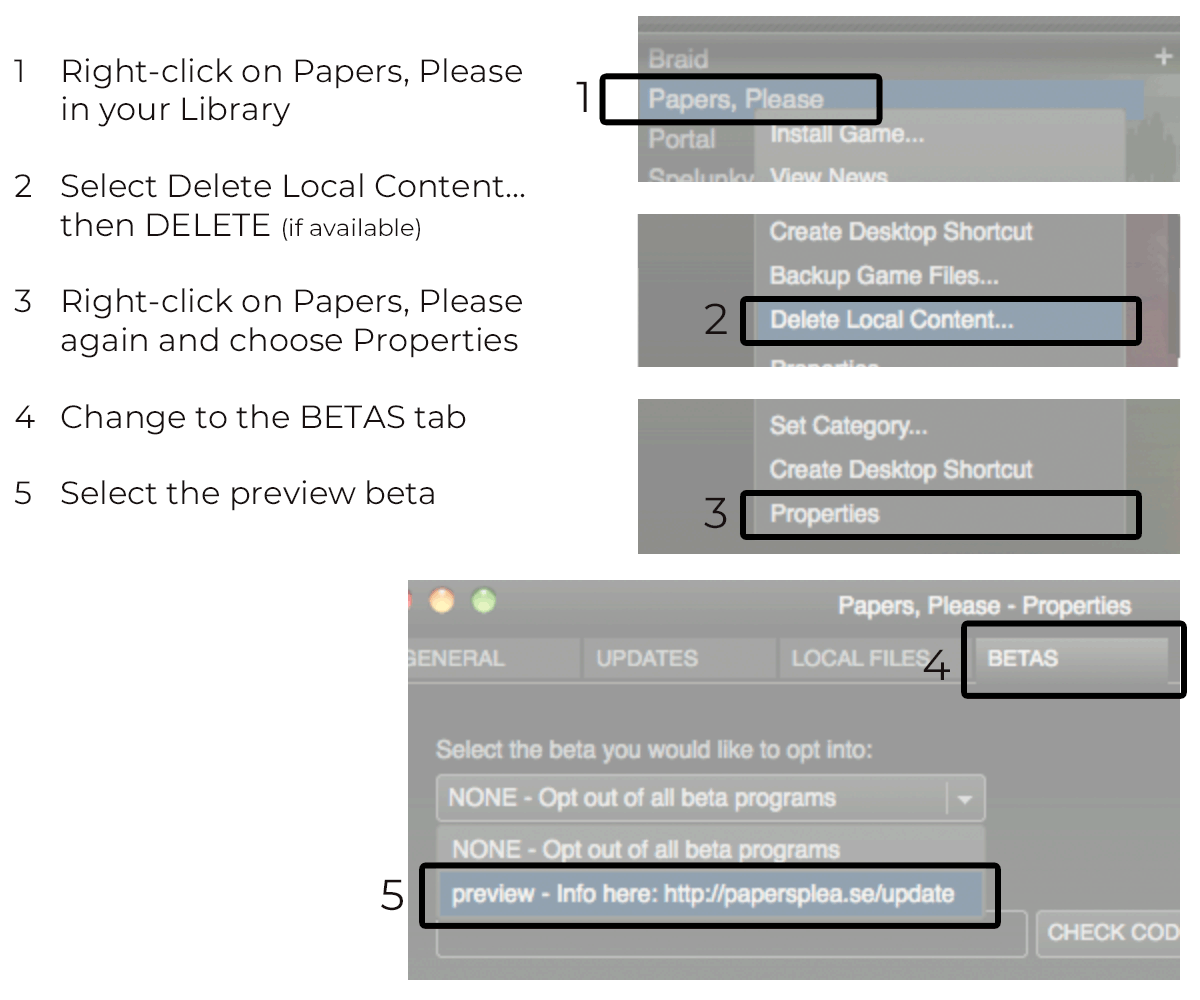
No password is necessary to unlock the build so leave that field blank. When you PLAY the game now, it should download, install, and run the preview release. Verify the version number on the title screen. You may need to restart Steam or delete your local content again in order to get the correct version.
IMPORTANT
After restarting Steam, always verify that you're on the preview branch by checking the BETA tab in the game's properties. Steam has a tendency to reset the branch to the default when restarting the client.
LEAVING THE PREVIEW BRANCH
To get back to the original non-preview release, follow the same steps and select "NONE - Opt out of all beta programs."